
Vector art to a STEP solid
Extrude skips the sketch and gives CAD a solid: the closed profiles of your art raised to a depth. Every sketch option applies too; see Vector art to a DXF sketch.
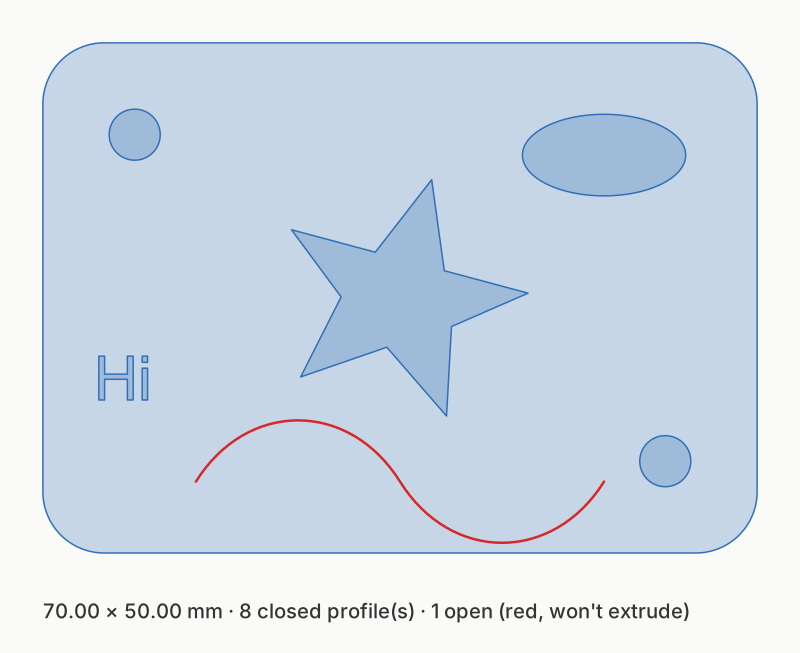
fixtures/examples/logo.svg extruded 3 mm, seen from above. The open
curve (red) is ignored.
Choose Extrude (STEP) and set Extrude › Depth.
shapemason extrude logo.svg --depth 3How profiles become solids
Section titled “How profiles become solids”- Closed profiles are nested by containment: an outline, the holes in it, and islands inside those holes. Each outline with its holes is one solid; each island is a solid of its own.
- Open paths are ignored, with a note.
- Straight edges give flat side faces. Circular arcs give true cylindrical faces you can select and fillet in CAD. Other curves are flattened into facets (within the flattening tolerance, 0.05 mm).
- The STEP part is named after the file, or Name (
--name).
Heights per layer or color
Section titled “Heights per layer or color”Every layer starts at z = 0 and rises to its own depth, so colors can become heights.
-
Put the art on layers: Layers from › Color (
--layer-by color) makes a layer per fill color, namedFILL_RRGGBB. -
Give layers depths: Extrude › Layer depths in the app and web app, or on the CLI:
Terminal window shapemason extrude badge.svg --layer-by color --depth "FILL_FF0000=3,FILL_000000=1.5,default=1"A depth of 0 skips a layer. Layers colored by fill keep their color in the STEP.
Use cases
Section titled “Use cases”Raised logos, two-height signs, multi-color prints, plates with real holes, overlapping lettering: step by step, for every front end.