
Vector art to a DXF sketch
A sketch is what CAD extrudes, revolves or cuts with. ShapeMason reads SVG (and SVGZ) or DXF, cleans it up, and writes a DXF in millimeters that CAD reads at the right size.
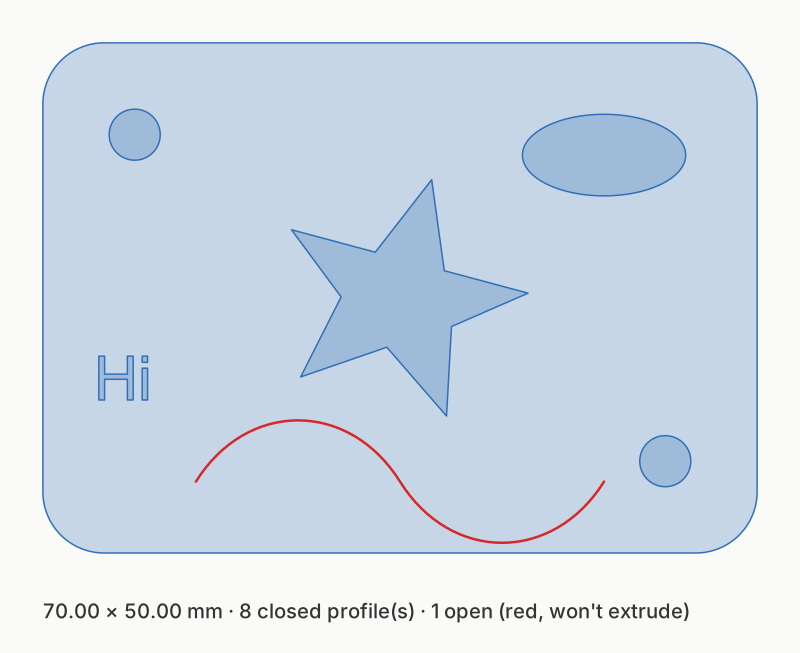
fixtures/examples/logo.svg as a sketch. Closed profiles are filled; the
open curve (red) won’t extrude.
Open the file and choose Sketch (DXF) (the default for vector art). Options are under Size & units, Placement, Shapes, Selection, Layers, DXF output and Cleanup.
shapemason sketch logo.svg # or just: shapemason logo.svgshapemason sketch logo.svg --width 120 --origin centerWhat it does
Section titled “What it does”- Units. Output is millimeters, with the units set in the file so CAD doesn’t guess. SVG coordinates without units are read as CSS pixels (96 per inch); if your art was drawn in millimeters or inches, set Units.
- Size. Scale to width or height scales uniformly to a size in mm; with both, it fits inside.
- Curves. Béziers that are circular arcs, circles and ellipses become real arcs, circles and ellipses; a profile of lines and arcs becomes one closed polyline. Other curves become splines. For importers that can’t read splines, choose Curves › Polylines or DXF version › R12.
- Cleanup. Endpoints closer than the tolerance (0.01 mm) are snapped so paths close, duplicate paths are deleted (even when drawn the other way round), and points along straight lines are removed.
- Open paths are kept, with a warning: CAD can’t extrude them. Turn on Closed shapes only to drop them.
- Text in SVG is set in your installed fonts. For exact results, convert text to outlines in your design tool first. The web app has no fonts, so it leaves text out.
- Raster images, clip paths and masks (SVG), and text, dimensions and hatches (DXF) are skipped, with a note in the report.
Common jobs
Section titled “Common jobs”| You want | Use |
|---|---|
| A size in mm | Scale to width / Scale to height (--width, --height) |
| (0,0) at the art’s corner or center | Origin (--origin min, --origin center) |
| A mirror image, for stamps and back-side etching | Mirror (--mirror) |
| Overlapping shapes merged into one outline | Union (--union) |
| Kerf or clearance | Offset (--offset 0.1 grows, --offset -0.1 shrinks) |
| Stroked lines as shapes with width | Strokes › Stroke to path (--strokes to-path) |
| Only some of the art | Only / Skip by element id, <g id> group or layer (--select, --exclude) |
| One DXF layer per color or group | Layers from › Color or Group id (--layer-by color, --layer-by id) |
Every option, with its default: Options.
DXF input
Section titled “DXF input”DXF files are read too: lines, arcs, circles, ellipses, polylines with bulges, splines and block inserts. The file’s own units are used unless you set Units to millimeters or inches. This is how you clean up a DXF from another tool: closing gaps, removing duplicates, merging overlaps or offsetting.
Use cases
Section titled “Use cases”Logos, laser kerf, messy DXFs, stamps, cut and engrave layers, one icon from a sheet, line art: step by step, for every front end.